
Tuesday, 16 June 2015

Tuesday, 19 May 2015


Thursday, 30 April 2015
Task 6 – Constraints
Polygon Count and File Size
Polygon count and file size are the two most common measurements of an object's cost and or polygon and vertex count. An example of this would be like a game character can stretch anywhere from 200 polygons to 50,000+ polygons. High end consoles and PC's also use vertices or polygons per character.
Polygons Vs. Triangles
When people talk about the poly count of models, they really mean the number of triangles that are used to create the model. Games almost always use triangles over polygons because of the built in accelerator modern day graphics cards have for rendering triangles. The polygon count in a models reporting station is always wrong because the triangle count is always higher. With this information you should always change in the settings that you are counting the triangles than polygons because you will get a more precise report. Polygons are useful thought especially for game developers with them mostly using four sided polygons which work well with transform methods and edge loop selections which speeds up the modelling process making your project run smother in general.Artists find polygons easier to use so they will use them but in the end they will be changed to triangles because games engines do it automatically.
Triangle Count vs. Vertex Count
Vertex count is important for performance and memory improvements. Basically the triangle count and the vertex count are similar if they are connected together. The way triangles and vertex's work is that for every 1 triangle you get 3 vertices but when you have 2 triangles you get 4 vertices and when you get 3 triangles you get 5 vertices and so on. The pattern is for the number of triangles you have 2 more vertices on.Rendering Time
The rendering is basically the final process you go through when you are creating your 2D or 3D image or animation and everything in between. You can compare rendering to when you take a photograph with a camera and the picture renders onto you screen for you to see. Rendering your work can be done in several different ways nowadays from non realistic wireframe rendering to advanced scanline rendering, ray tracing and even radiosity. Depending on the method of rendering you choose from the time expectancy of the work to be rendered varies from seconds to hours to days so its best to pick which one works best for you.Source of facts: https://en.wikipedia.org/wiki/Rendering_(computer_graphics)
Real-time
The goal of Real time rendering is to show as much information as possible to a degree. The goal is to achieve a photo-realistic picture at an acceptable rendering speed which is usually 24 frames. Rendering software represents visual effects and flares and in dept motion blur. These are basic methods used for games. The incredible increase in processing power has allowed us to create amazing realism in real time rendering such as HDR renderingSource of facts: https://en.wikipedia.org/wiki/Real-time_rendering
Non Real-time
Non real time productions are great for slow limited processing power and still obtaining high quality images. Rendering non real time scenes can vary between seconds and days usually more than real time. Rendered frames are stored on hard disks and can be easily transfered to other media platforms such as optical disks. The frames are typically set between 24 and 30 frames which achieves the illusion of movement.To get a photo-realism appearance the technique of ray tracing and radiosity are used because this is best for this look.
Rendering can be expensive depending on the time you want to get your rendering done if you are cheap you can be waiting for days or weeks and if you have the money to pay for top quality equipment you can be done in minutes or seconds. With the increase in technology its getting cheaper and cheaper to get top quality equipment though.
Task 5 - 3D Development Software
3D Studio Max
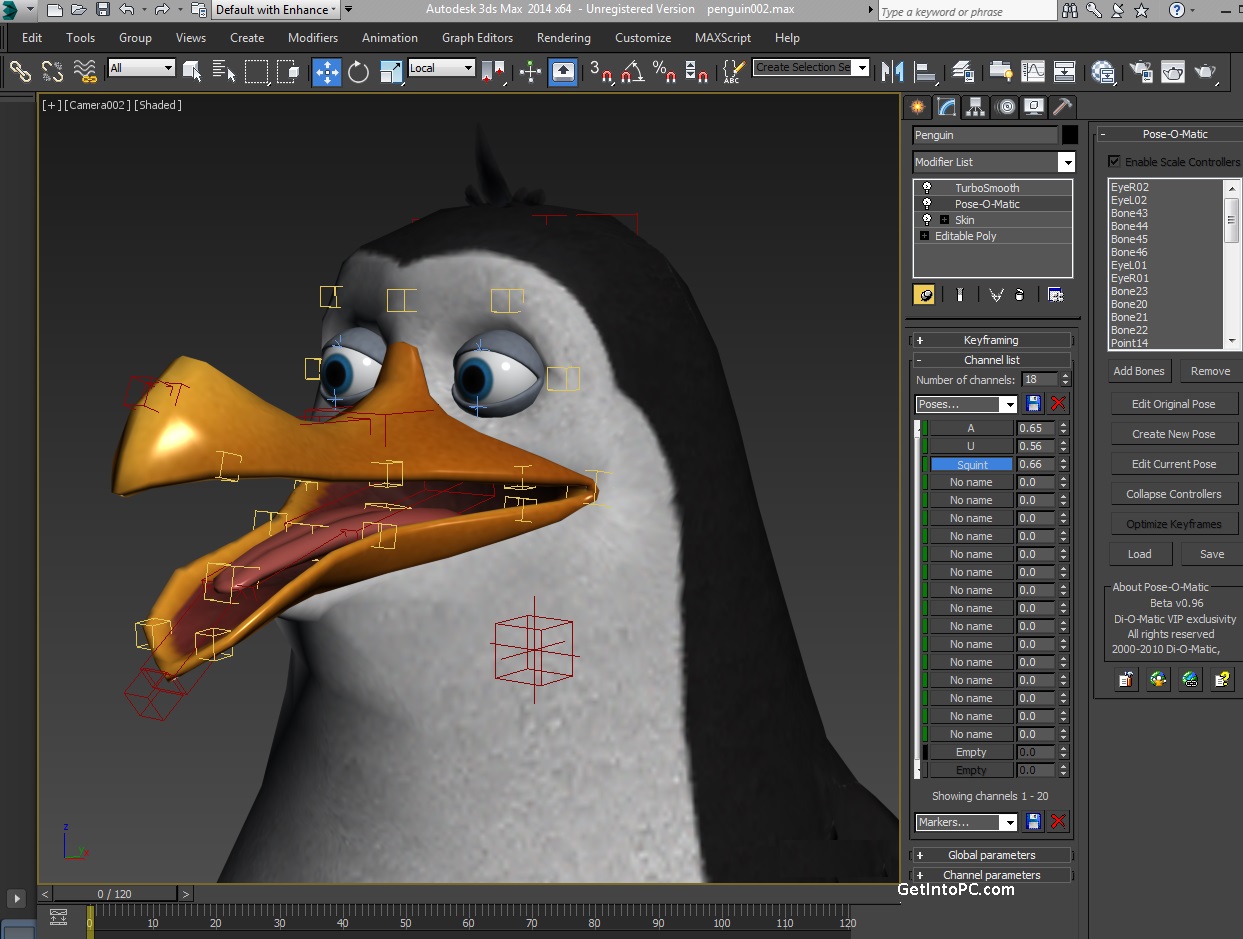
3D Studio max also known as Autodesk 3Ds max but formerly known as 3D Studio max is a 3D computer Graphics software stable released on the 12 April 2015 used to create 3D animations, models, and images. It was developed and produced by Autodesk Media and Entertainment. The application is primarily for the windows platform and it has fantastic modelling capabilities and flexible plugin architecture.The application is most frequently used by video game developers but is also used by TV commercial studios and even architectural visualization studios. The tool the program has can also be used to create great effects for movies.
The program also has additional tool to assist modelers and animators with the latest version of 3D max has shaders, dynamic simulation, particle systems, radiosity and much more.

source: http://getintopc.com/wp-content/uploads/2013/07/download-3ds-max-2014-free.jpg
Maya
Maya is a 3D computer graphics software that runs on Microsoft windows, Mac OS and Linux, originally developed by Alias Systems Corporations and is now owned and developed by Autodesk. The software is used to create interactive 3D applications, including games, animated film, TV series and even vision effects.
The software is currently being used to create the very popular animated TV show South Park.


Maya 1.0 was released in February 1998 and bought by Autodesk in 2005 but kept the name. Maya is a nominating force in the 3D modelling application world.
Source of facts: https://en.wikipedia.org/wiki/Autodesk_Maya
Lightwave
Lightwave is used for rendering 3D graphics, for both animated and static. It is a package that includes a rendering engine that supports advanced features as realistic reflection and refraction., radiosity and even caustics. This application is good for artists that want support for both polygon modelling and subdivision surfaces. The program also has a reverse and forward feature for animated characters, particle systems and dynamics.

source of facts: http://en.wikipedia.org/wiki/LightWave_3D
Blender
Blender is a fantastic professional level free 3D computer graphics software which is created for 3D artists which want to create animated films, visual effects, art, 3D printed models, interactive 3D applications and even video games. Blenders stable release was on the 31st of March 2015. The features Belnder offers are great for 3D artists they include features like UV unwrapping, texturing, raster graphics, editing, rigging andskinning, fluid and smoke simulation, particle simulation, sculping, animating, rendering and much much more. Alongside these amazing features for 3D artists the program also has its very own integrated game engine.
Source of Facts: https://en.wikipedia.org/wiki/Blender_(software)
Cinema 4D
Cinema 4D is a 3D modelling, animation and rendering application develuped by Maxon computer GmbH of Friefrichsdorf in Germany. the application is capable of polygon/subdivision modelling, animating, lighting, texturing, rendering and hundreds of common features found in 3D modelling applications.
This application is different from others because it has four different variants available for the user to from for example the prime application which is the core one Cinema 4D, a Broadcast version which has additional motion graphical features, Visualize which adds functions for architectural design and then theirs Studio which includes all modules. The application runs on both Windows and Macintosh PC's so its extremely accessible for 3D artists. This application is for the Artists that desire a specific use of an application. This application was developed for Amiga computers in the 1990s.
Source of facts: https://en.wikipedia.org/wiki/Cinema_4D
ZBrush
ZBrush is a top quality digital sculpturing tool which combines both 3D/25D modelling, texture and painting.
It uses a new pixel technology which stores lighting, colour, material and even depth information for all objects on the screen. The only main difference between ZBrush and regular modelling applications is that this one is build upon the idea of sculpturing.
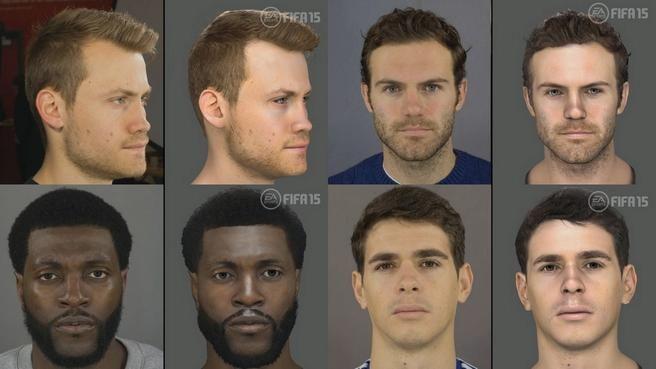
The application is used to create high resolution sculptured models with up to 10 million polygons. The program can be used to create sculptures for movies, games and even animations. The application is primarily used by companies ranging from ILM to Electronic Arts to create the football characters in Fifa.
ZBrush has dynamic levels of resolution which allows artists to changes to their models easily on a global and local level.
The application can easily make medium and high frequency details in maps. The results can then be added simply into other maps with a low poly count. The features this application can do work great and work extremely ell at not overheating when processing complicated scenes.
Source of facts: http://en.wikipedia.org/wiki/Z_Brush

Sketchup
Sketchup is a fantastic 3D modelling program and it has a huge range of applications within such as architectual, civil, mechanical, film and as well as video game design applications. The major benefit with this application is that its professional level and its free.
the program is very easily to use which is why its used in schools for teaching children. The application has its own 3D warehouse which allows the user to use free 3D models which is great for learning. The program includes layout functionality, allows surface rendering in variable and allows third party plugins. cool new feature within Sketchup is the adaption of Google earth, you can now place you models in Google earth.
Source of facts: http://en.wikipedia.org/wiki/Sketchup
File Formats
Every 3D application allows the user to save the work in a file format which the artists gets to chose from.
Eamples of these Proprietary formats are, AutoCAD, dxf, 3D Studio MAX, Maya, Lightwave and Open formats are, obj and dae.
An Proprietary format is main used by companies, organizations and individuals.
Source of facts: http://en.wikipedia.org/wiki/Proprietary_format
Task 4 - Mesh Construction
How are 3D Models made?
3D artists have lots of different types of modelling technologies available for them to use. There are six common ways to model data that can be generated onto a 3D model into a computer, each of these methods offer advantages and disadvantages to the 3D artists so its up to their own personal preferences for which one they choose.

3D models are made up of polygons.
Created by connecting points, vertices, together via edges to define triangular faces with these you can create the 3D model you desire. It may take a few or alot but with polygons you will create you 3D model. You can make your 3D model through Mesh modelling this is available in almost every non CAD and some CAD software's.
Source for facts: http://home.lagoa.com/2014/03/what-are-3d-models-made-out-of/
Primitive Modelling
Primitive modelling is a very popular technique of modelling it is where you model from an enviroment using shapes like the following:
Cubes
Pyramids
Cylinders
Spheres
2D primitives, such as squares, triangles, and disks


Box Modelling
This is the most popular and the most easy to use tools for modelling used today by 3D artists mainly because its simple and is the most editable tool around, you can pretty much create anything you want with just this one tool.
This tool works well together with two other tools called the subdivide tool which splits faces and edges into smaller pieces by adding new vertices and the extrusion tool which applied to a face does what the name entails and the face is pushed and pulled across a section of which you desire.

source: https://upload.wikimedia.org/wikipedia/commons/thumb/3/39/BoxModelingIntro_Form.jpg/511px-BoxModelingIntro_Form.jpg
The video below shows a tutorial which you yourself can follow or just watch on how box modelling is done to create a head.
Extrusion Modelling
The second most common modelling technique for 3D artists is extrusion modelling also known as inflation modeling or extrusion modelling. This is where the user creates a 2D shape nice and simple and then uses a second image from another angle and the user extrudes the 2D shape into 3D following the outline the second images gives you. this method is extremely useful for creating heavily detailed objects and creating you own drawings into 3D models.

Sketch Modelling
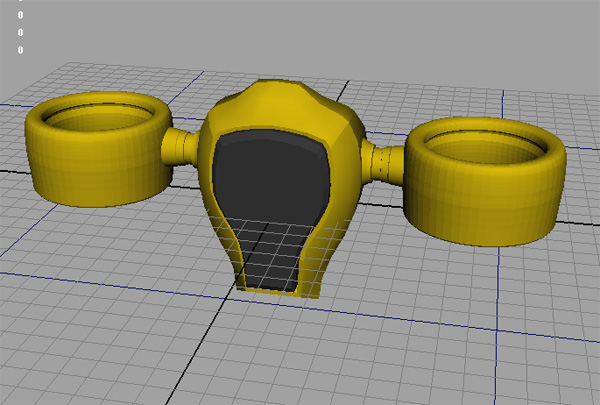
Sketch modelling is great for a short time project and a long time project because of the great use of sketch modelling. You can easily create low or high detail projects quickly which is great for 3D artists to test ideas.3D Scanners
3D scanners are amazing machines that scan already created objects which can be highly detailed and then scanned and turned into a highly accurate digital representation..
Task 3 - Geometric Theory
The Cartesian Coordinates System
The Cartesian coordinate system is a coordinate system created in the 17th century by René Descartes, the system specifies each point uniquely by a pair of numerical coordinates. The Cartesian Coordinates system was important and still is because it revolutionized mathematics by providing proof that the link between Euclidean geometry and algebra is real and means something.

Source: http://www.basic-mathematics.com/images/coordinate2.gif
The points are named X,Y,Z in its basic form and they are a equal distance apart in perpendicular lines. The point the lines meet is called the origin and the coordinates are referred to being on an axis. You can specify the position of any point in the three dimensional space using the Cartesian coordinates.
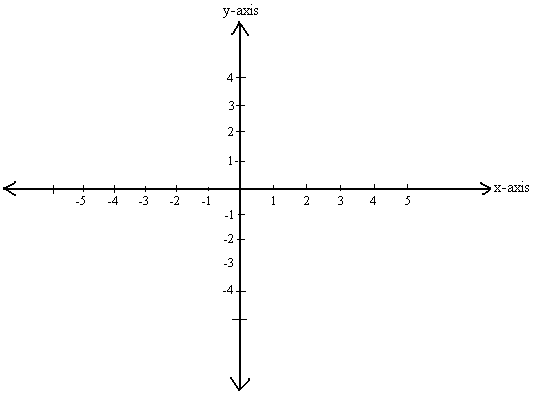
The points are named X,Y,Z in its basic form and they are a equal distance apart in perpendicular lines. The point the lines meet is called the origin and the coordinates are referred to being on an axis. You can specify the position of any point in the three dimensional space using the Cartesian coordinates.
2D Vector artwork is created through a computer connecting points, plotting them on an X and Y axes, joining these points with lines also called paths you will create an image. The shapes can be colored and filled and the lines can be changed making them thinner,fatter and much more, you can easily do all of this within the illustrator application. Programs that work in 3D operate on a 3D grid of coordinates which are very similar to the 2D coordinates except there is a third axis known as the Z or also known as the depth axis on the 3D grid.
Examples of this process:

As you can see in the image above this is a vector image created in adobe illustrator using points and lines then its colored and filled to create a beautiful piece of artwork. The vector artwork is of David Beckham.
Geometric Theory and Polygons
basic objects used in mesh modeling are called vertex's which are a point in the three dimensional space. A mesh is basically a group of polygons which are connected together by shared vertices. A mesh is often referred to as a wire frame model. two vertices connect by straight lines become an edge and three connected become a triangle which is the simplest form of a polygon.
In the Euclidean geometry any three non collinear points determine a plane, and because of this any triangle will always inhabit a single plane. The geometric theorem is an area in mathematics and basically the connections between algebraic properties such as the groups and topological and geometric properties of spaces on which these groups act.
source of facts: https://en.wikipedia.org/wiki/Geometric_group_theory
Surfaces are the faces BOOM. Surfaces are the areas on objects that you see.
Task 2. Displaying 3D Polygon Animations
How are 3D Images displayed
A 3D model is basically just a mathematical representation of any three dimensional object, the object will will have such things like textures, lighting, shadows, luminosity and etc. 3D objects are much more detailed than 2D objects. A model is said to not be a graphic until its officially displayed.
A model can be displayed visually as a 2D image through 3D rendering but it cant be shown as a 3D image unless you have a 3D screen which isn't currently invented. 2D image can also be displayed if used in a no-graphical computer simulations and calculations. Simply graphics can be rendered through a processing unit (CPU) it does this by telling the graphics processor unit (GPU) what to render like textures, lighting ad etc.
 source: http://www.techmixer.com/free-3d-graphic-design-software/
A model can be displayed visually as a 2D image through 3D rendering but it cant be shown as a 3D image unless you have a 3D screen which isn't currently invented. 2D image can also be displayed if used in a no-graphical computer simulations and calculations. Simply graphics can be rendered through a processing unit (CPU) it does this by telling the graphics processor unit (GPU) what to render like textures, lighting ad etc.
source: http://www.techmixer.com/free-3d-graphic-design-software/What is API
API stands for Application-Programming interface but as an abbreviation stands for (API). The application allows you to set instructions and standards for accessing a software application web based or a web tool. Software companies release its API to the public so software developers of the world can design products that are powered by its service. An example of good use of releasing a companies API would be Amazon.com they released their API so website developers could easily access Amazon's product information. Companies will use Amazons API to keep links and prices up to date for example Argos or Tesco they will want to keep the prices up to date or they may loose profits.API is sometimes confused with a user interface but its not its a software to software interface. With the help of APIs, applications can talk to each other without any user knowledge or intervention.
An example of API being used would be like if you buy a movie ticket online and you use your credit card, the movie ticket website will use an API to send your credit card information to an application to verify your information to make sure its correct. If the payment is confirmed the application will respond back saying that its OK to give the buyer the ticket.
What is a Graphic Pipeline

The Graphics pipeline also known as rendering pipeline in the 3D computer graphics world refers to the steps used to create a 2D representation of a 3D graphic. Basically the graphics pipeline is the process used to turn a 3D model from for instance a game and it will display what the 3D model is on a computer screen. Over the years the pipeline has been improved making it faster and it has evolved in different ways to become usable on all sorts of platforms such as OpenGL and DirectX, pipelines but the general concept of what the pipeline is form remains the same.
Source for the facts: https://en.wikipedia.org/wiki/Graphics_pipeline
Source for the facts: https://en.wikipedia.org/wiki/Graphics_pipeline
Subscribe to:
Comments (Atom)